Compare landscape apps
DreamzAR alternatives: which part of the app do you want to replace?
The short answer
DreamzAR combines AI photo design, a manual editor and augmented reality. For an alternative, try Gardenful when you want help choosing the planting, iScape when you want to arrange individual plants, or Neighborbrite for a free start with paid editing options. If you use all three DreamzAR modes, switching may mean giving something up.

Choose by the work you want to do
Gardenful publishes this comparison. Choose an app by the work you want it to do: design the planting, let you place each plant, or show a layout in AR.
| App | Useful when you want… | The tradeoff |
|---|---|---|
| AppGardenful | Useful when you want…A realistic yard concept shaped by your preferences, with suggested plants and quantities. | The tradeoffiPhone-only. It does not replace a manual 2D editor or an AR walkthrough. |
| AppiScape | Useful when you want…Placing individual plants and materials, with 2D and AR design options. | The tradeoffYou make more of the layout decisions. AR is on iOS; the Android listing describes 2D tools. |
| AppNeighborbrite | Useful when you want…A free start with photo concepts, followed by paid tools for targeted edits. | The tradeoffEditing, plant information and export options depend on the plan. |
| AppKeep DreamzAR | Useful when you want…Moving between generated concepts, manual 2D placement and iOS AR. | The tradeoffSubscriptions are separate for web, iOS and Android. AR is iOS-only. |
Sources: Apple App Store, iScape, Google Play, Neighborbrite, DreamzAR, DreamzAR
Check what you would miss before switching
DreamzAR's appeal is the combination: generate a concept, refine it through chat, then place plants or other elements in a 2D editor. Its iOS version also offers AR. If you enjoy making those adjustments yourself, a simpler photo app may feel restrictive even when you prefer its pictures.1
The opposite is just as reasonable. If you open an editor and get stuck choosing plants, more placement controls may not solve the problem. A guided planting workflow can be a better fit. Write down the last decision that stopped you: choosing a style, selecting plants, arranging them, or sharing a useful result. That is the feature your next app needs to earn.
Compare the bill for the project you actually have
A week of exploring one bed and a year of revisiting the whole yard are different purchases. Check the billing period and included tools at checkout.
| App | Published price or entry option | What to check |
|---|---|---|
| AppDreamzAR | Published price or entry option$19.99/month or $199/year. | What to checkA subscription does not transfer between its web, iOS and Android apps. |
| AppGardenful | Published price or entry optionFree to try. US Garden Pass: $7.99/week or $49.99/year. | What to checkRequires an iPhone with iOS 18 or later. Compare the weekly and annual commitment. |
| AppiScape | Published price or entry optionLimited free use. Pro: $29.99/month or $299.99/year. | What to checkAn alternative for more manual control; its listed Pro price is higher than DreamzAR's. |
| AppNeighborbrite | Published price or entry optionLimited free generations, with paid tools. | What to checkCheck the consumer plan's price, billing period and features in the version you will use. |
Sources: DreamzAR, Apple App Store, iScape, Neighborbrite
Try one front bed before moving the whole project
Keep a DreamzAR result as your starting comparison, then give one alternative the same job. Use the brief below as a prompt in an AI tool or as a placement checklist in a manual editor.
Refresh the planting below a front window
Keep the existing house, window, tree, path and bed edge. Change only the planting inside the bed. Add a soft, flowering look with plants suited to my location and observed sunlight. Keep the window and route clear. I want occasional seasonal maintenance, not regular shaping.
- 1
Look at the house and path first
Reject a concept that moves the window, widens the bed into the walk or replaces a tree you wanted to keep. A prettier image of a different yard will not help you judge this project.
- 2
Make one revision
Lower the planting below the window while keeping the rest: describe the change in an AI editor or swap and resize plants in a manual one. Was that easier than in DreamzAR, and did you keep the parts you liked?
- 3
Check what you can take to the nursery
Look for identifiable plant suggestions, quantities and an explanation of the design. Compare mature sizes with the real bed; a visual arrangement cannot establish exact spacing.
Keep the original photo, your brief and the useful output from each app together. Choose the result you can explain and act on, not simply the most dramatic makeover.
If choosing the plants is where you get stuck
Gardenful starts with your yard photo and asks about your style, preferences and maintenance level. It suggests the planting for you. These screens show the connection between the design and the plants, so you can picture the change before you shop.
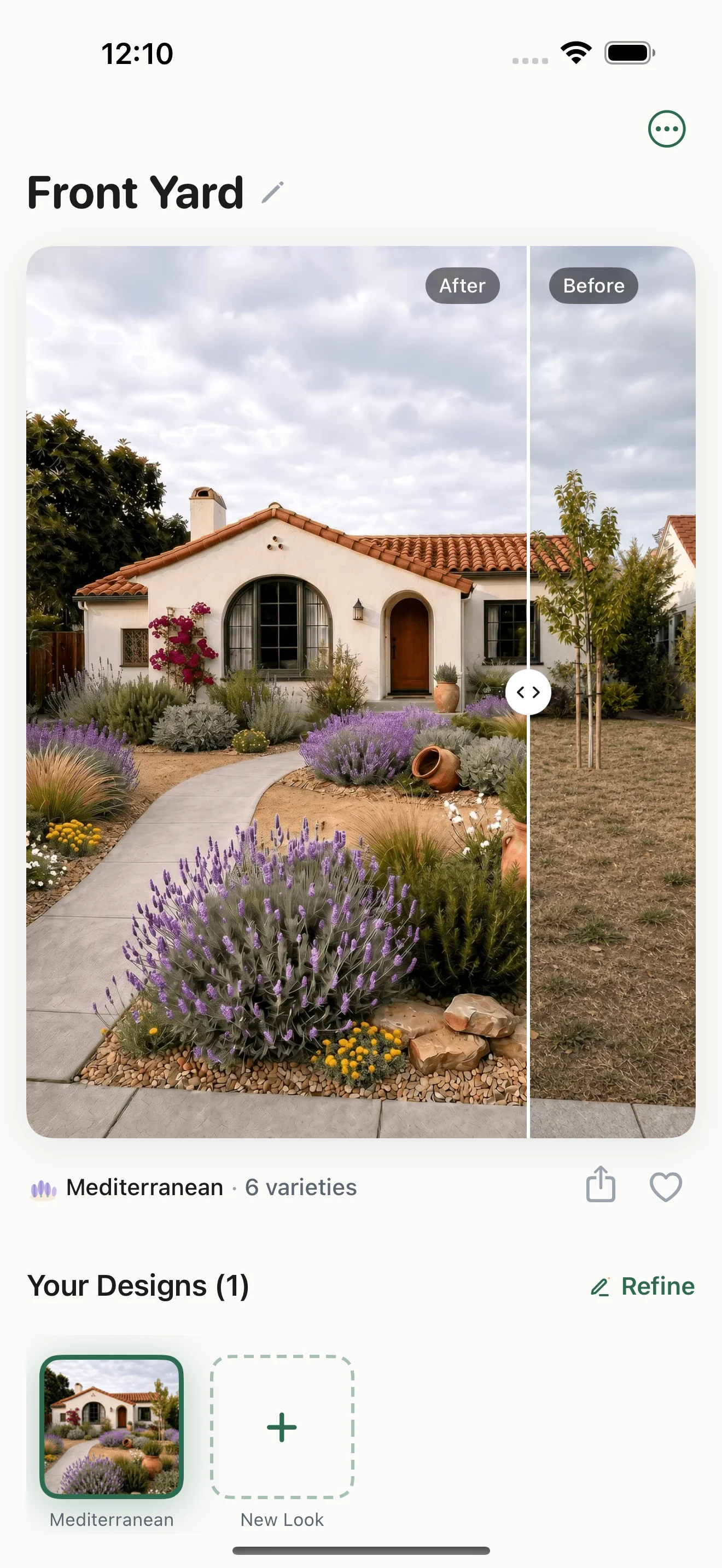
Picture the planting beside your house
Compare the design with your original yard photo and decide whether you like the look in your space.
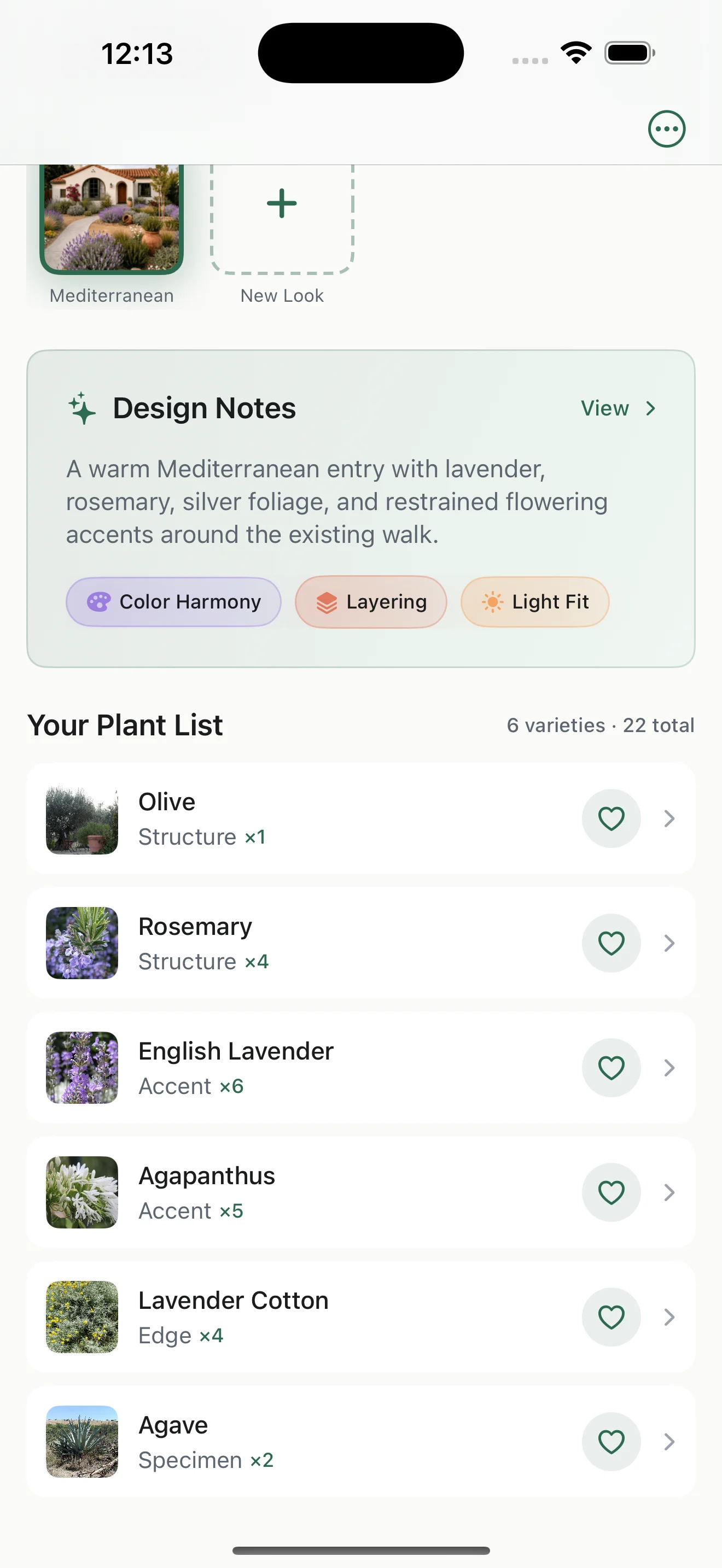
Find out what creates that look
Use the suggested plant names and quantities to make a shortlist. Check local availability, mature size and growing conditions before buying.
Try Gardenful if you want a beautiful planting idea without assembling every plant yourself. Keep a manual editor if arranging each element is the part you enjoy.
Frequently asked questions
What is a good DreamzAR alternative for a beginner?
Gardenful is worth trying on iPhone if you want help choosing the planting as well as seeing it in your yard. Neighborbrite is an option for browser-based exploration. Try one small area before paying for a larger commitment, and choose according to the decisions you want the app to handle.
Which DreamzAR alternative has augmented reality?
iScape offers AR design on iOS; its Android listing describes 2D tools. Check your device and subscription before choosing it for AR. Gardenful works from yard photos and does not offer an AR walkthrough.
Can I move a DreamzAR project into another app?
Check whether the new app can import your project. If it can’t, save your original photos and design notes, then try recreating one small area before moving the rest.
 Gardenful
See a planting idea for the yard you already have
Bring a photo of one bed or corner to Gardenful. Tell it what you like and how much gardening you want to do, then see a realistic design with plants to help you get started. Free to try on iPhone.
Gardenful for iPhone
Download the app free and start with a photo of your yard.

How we compared these options
This comparison uses official feature and pricing pages, reviewed October 3, 2026, plus Gardenful's published product information.
We compared how each app creates a design, which devices it supports and what it costs. The recommendations reflect the different jobs homeowners want help with.
Sources(6)
- [1]
- [2]
- [3]
- [4]
- [5]Neighborbrite tools
Neighborbritehttps://neighborbrite.com/
- [6]